
Before you download anything
Check your state on our Juwa 777 legal states map. If you live in one of the 15 states that ban or restrict sweepstakes casinos, stop here. A working download does not make playing legal.
Red flags in a download link
- The link comes from a comment, a cold DM or a "giveaway" post.
- The file is much smaller or larger than your distributor said.
- The installer asks for contacts, SMS, call logs or accessibility access.
- The page asks for your card details or a gift card before the download starts.
Juwa 777 APK download for Android
Get the link from your distributor
Ask your distributor for the current APK link and the expected file name and size. Never use links sent by strangers in comments or DMs.
Allow installs from your browser only
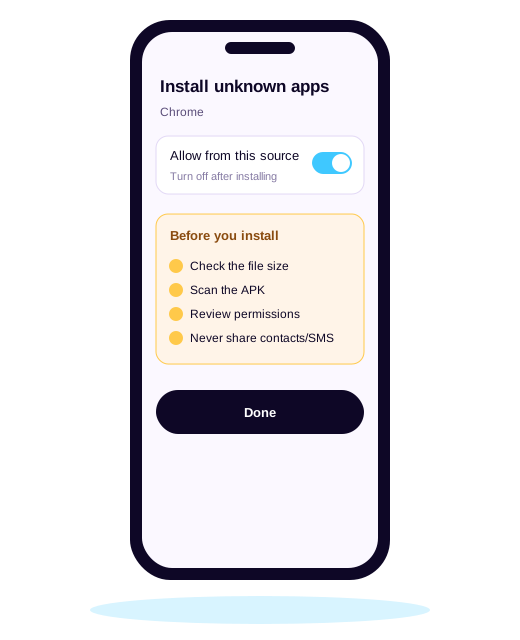
On Android 8 or newer go to Settings > Apps > Special app access > Install unknown apps, and allow only the browser you will use.
Scan the file before opening
Upload the APK to a malware scanner such as VirusTotal, or run Google Play Protect. Delete it if any engine flags it.
Check permissions during install
A game needs storage and network access. Deny contacts, SMS, call logs, accessibility and "display over other apps".
Turn the setting back off
After installing, switch "Install unknown apps" off again for your browser so nothing else can sideload silently.
Android requirements
| Android version | 5.0 or newer is commonly listed; 8.0+ recommended for security patches Reported |
|---|---|
| Free storage | At least 200 MB for the app and game assets Reported |
| Connection | Stable Wi-Fi or 4G; fish tables drop shots on weak signals |
| Permissions a game needs | Network and storage only |
Juwa 777 download for iPhone (iOS)
Open the install link in Safari
Distributor links for iPhone usually open a page that installs the app with an enterprise or developer certificate.
Trust the developer profile
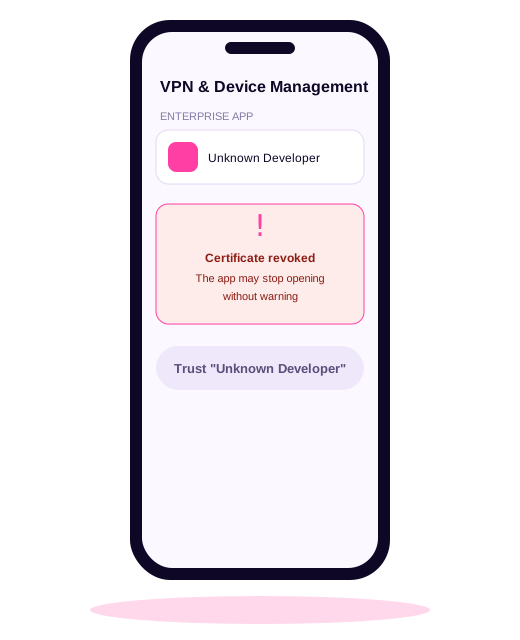
Go to Settings > General > VPN & Device Management, tap the developer name and choose Trust. Only do this for a link you can verify.
Expect the app to break
Apple can revoke these certificates at any time. When that happens the app stops opening and you need a fresh link from your distributor.
Remove the profile when you stop playing
Delete the app and remove the developer profile from Device Management so it cannot be reused.
Many players in Apple's own community forum report the same symptom: the app installs, then refuses to open weeks later. That is a revoked certificate, not a problem with your phone. Our iPhone troubleshooting guide covers every error message.
What about the Google Play "Juwa" apps?
When we searched Google Play in October 2026 we found at least four apps using "Juwa" or "Juwa 777" in their name, published by different developers Verified. Some state plainly that they involve no real-money gambling. They are legitimate store apps, but they are not connected to Juwa distributors, so credits cannot move between them.
After you install
- Write down your username and the distributor's contact; you cannot recover an account without them.
- Set a deposit limit for yourself before the first load.
- Keep Google Play Protect switched on.
- Uninstall if the app starts showing ads for other apps or asks for new permissions after an update.
Download FAQ
Is there an official Juwa 777 download link?
We could not find a verifiable official source. Juwa777.com and several look-alike domains all describe themselves differently. In practice your distributor supplies the link, which is why checking the file matters.
Why does my Juwa 777 APK say "App not installed"?
Usually an older version is already installed with a different signature, the download was incomplete, or there is not enough storage. Uninstall the old version, free up space and download again.
Can I play Juwa 777 on PC?
Some players run the Android APK inside an emulator such as LDPlayer or BlueStacks. The same safety checks apply, and it does not change the legal status in your state.
Which Google Play "Juwa" app is the real one?
We could not link any Google Play listing to the distributor-run platform. They come from various developers, many are free-to-play social casino apps, and we found no way to redeem their coins through a Juwa distributor.